Work mouse comparison
MX Master 3S vs Logitech Lift: productivity controls or vertical posture?
Compare Logitech MX Master 3S and Lift by hand size, posture, scrolling, weight, controls and the kind of desk work each one suits.
The short answer
Choose MX Master 3S when scrolling, extra controls and creative or document-heavy productivity matter most. Choose Lift when you specifically want a vertical handshake posture and have small-to-medium hands. Lift is not simply the cheaper MX Master; it solves a different shape problem.
What matters most
- MX Master 3S is a large right-handed productivity mouse for medium-to-large hands.
- Lift uses a 57-degree vertical shape and is offered in right- and left-hand versions.
- The MX Master adds a thumb wheel and more advanced scrolling controls.
- Neither is designed as a light, fast competitive gaming mouse.
Products in this decision
Two different kinds of comfort.
The cards use current active catalogue records and link to the manufacturers so you can confirm regional variants.
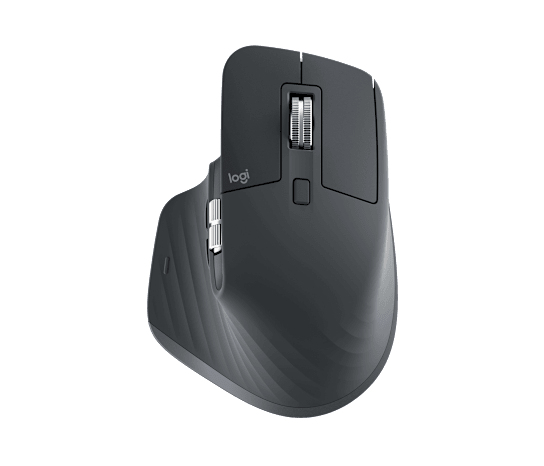 Official Logitech product image
MX Master 3S
Best for: Medium-to-large right hands doing document, spreadsheet, browser or creative work that benefits from advanced scrolling.
A productivity flagship with quiet clicks, excellent scrolling and broad cross-platform software support.
Trade-off: Heavy, right-handed and limited to a low report rate that is unsuitable for fast gaming.
View official product page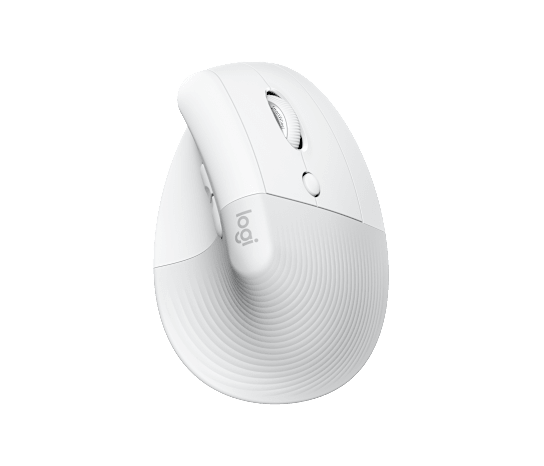 Official Logitech product image
Lift Vertical
Best for: Small-to-medium hands that deliberately want a vertical work mouse and quiet everyday controls.
A gentle 57-degree handshake posture with quiet clicks and an approachable vertical shape.
Trade-off: Not designed for fast flicks, and large hands may need a bigger vertical model.
View official product pageProducts are included for fit and comparison, not commission. Rankings in the finder remain independent of retailer availability.
At a glance
Compare the practical differences.
| Decision | MX Master 3S | Logitech Lift | Choose by |
|---|---|---|---|
| Shape | Traditional right-hand ergonomic | 57-degree vertical | The posture you want to maintain |
| Hand fit | Medium to large | Small to medium | Reach every control without stretching |
| Controls | Seven buttons and two scroll directions | Six buttons and conventional scrolling | How much shortcut control you use |
| Weight direction | Heavy | Heavy | Both stay planted rather than feeling gaming-light |
| Gaming fit | Casual only | Work-first | Choose another family for fast aim |
A vertical shape should win only when you choose it deliberately.
Lift changes forearm rotation and takes an adaptation period. That specialist shape deserves high priority if it is your stated goal, but it should not be recommended merely because comfort is a general priority.
MX Master earns its space through controls.
Its value is strongest in long documents, timelines and applications that benefit from horizontal scrolling and configurable buttons. If you do not use those controls, its size and weight become harder to justify.
Hand size is a hard constraint.
Lift can feel cramped in a large hand, while MX Master 3S can force extra reach in a small hand. Shape diagrams and hand measurements are more useful than a generic best-mouse ranking.
Common questions
A few useful clarifications.
Is a vertical mouse always more ergonomic?
No. It changes posture, but comfort also depends on hand size, reach, desk height and how you move the mouse. Persistent pain should be discussed with a qualified health professional.
Can I game with MX Master 3S or Lift?
Both can handle casual games, but their weight, shape and report-rate priorities are aimed at work rather than fast competitive play.
Which one is better for large hands?
MX Master 3S is the safer choice of these two for medium-to-large hands. Lift is primarily shaped for small-to-medium hands.